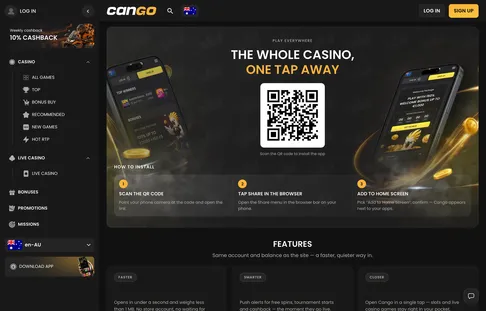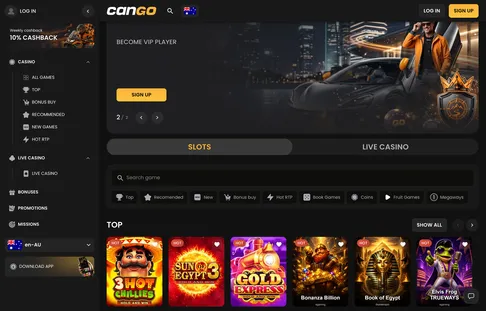

Aussie pokies players who want one-tap access to Bonanza Billion, Sun of Egypt 3 or Elvis Frog TRUEWAYS can skip the App Store and Google Play altogether. The Cango app is a Progressive Web App (PWA) installed straight from your mobile browser onto the home screen. It takes under a minute and needs almost no storage. Once the icon sits on your phone, you can enter promo code WP1, deposit A$45 for the 150% match up to A$1,500 plus 300 welcome spins, and play the daily 100-spin batches on the move.
Cango casino app: install in one table
Before you start tapping through browser menus, here is how the Cango casino app setup works on each device. The platform uses a PWA instead of a store file, so the Download iOS and Download Android buttons on the site simply start a home-screen install. You get the full lobby, including 277 BGaming pokies, 60 Thunderspin titles and the live tables, in a clean full-screen window without an address bar. The minuses are worth saying plainly: you cannot find it by searching a store, and PayID is not in the cashier list.
| Device | Steps | What you need |
|---|---|---|
| iPhone and iPad | Open Safari, tap Share, choose Add to Home Screen, tap Add | Safari, an internet connection and an 18+ account (or sign up in the app with WP1) |
| Android phones and tablets | Open Chrome, tap the three-dot menu or the Download Android button, choose Install app or Add to Home screen | Chrome, a stable 4G, 5G or Wi-Fi connection, VPN switched off |
| Desktop to phone (QR code) | Open the casino’s app page on your computer and scan the QR code with your phone camera | A phone camera with QR scanning and a default mobile browser |
Every pokie on desktop carries over to the mobile icon, so this site’s game-to-bonus chain works the same in your palm. The 300 welcome spins (100 on day one for Bonanza Billion, 100 on day two for Thunder Coins XXL and 100 on day three for 3 Super Hot Chillies) give three days of mobile play for a single A$45 deposit. Each batch typically lasts 24 hours at about A$0.20 a spin, and an icon on your main screen makes it far easier to log in on days two and three before the clock runs out.
Cango app: fixing app problems
Even a light web app hits the odd snag when a phone updates or a browser hoards old data. Most Cango app problems come down to three quick fixes:
- The icon did not appear after install. On iPhone this usually happens when the site was opened in Chrome, Firefox or an in-app social media browser instead of Safari; on Android, home-screen permissions may be locked. Reopen the site in the main browser (Safari on iOS, Chrome on Android) and repeat Add to Home Screen, and on Android check that adding icons to the home screen is allowed in settings.
- The app keeps logging you out. Private Browsing in Safari or Incognito in Chrome wipes the session every time you close the window. Install the icon from a normal tab, or use Google sign-in for a two-tap login. Turn off any VPN app too: VPN use is banned by the casino rules and triggers security logouts.
- Games freeze on the loading bar or the balance looks stuck. Old cache files can clash with updated games. Clear cached images and files in your browser settings (keep saved passwords), then relaunch the icon. If a round drops out in a tunnel, the game server settles it and your A$ balance updates when you reconnect. Live chat inside the app answers 24/7 in about 2 minutes.
Cango mobile: iPhone install
Cango mobile on an iPhone or iPad relies on Safari’s built-in web app support, which turns the casino lobby into its own tile on the home screen. Once you open Cango casino in Safari, look for the Share button in the bottom toolbar, the square with an upward arrow, and tap it. Scroll the menu to Add to Home Screen, check that the name reads Cango, and tap Add in the top right corner. Browsing on a laptop first? Open the casino’s app page and point your iPhone camera at the QR code, which launches Safari right at the install prompt.
The iPhone icon opens without Safari’s toolbars, which leaves more room for the reels and the Slots / Live Casino switch. Every one of the 277 BGaming games has Play demo, and the (i) button inside a game shows its exact RTP before you stake real A$. The mobile cashier takes Visa, Mastercard (up to about A$5,000 per transaction) and crypto (BTC, ETH, USDT, LTC from about A$20), with a general minimum of A$15, or A$45 with WP1 for the welcome pack.
Here is an illustration of a Sunday on the phone. You open the Fruit Games shelf to spin Fruit Million and claim the Sunday reload of 50% up to A$150. A A$100 Visa deposit adds A$50, so you start with A$150 and x30 wagering on the bonus: A$1,500 in bets within the usual 7 days, with spins under the typical A$7.50 maximum. The PWA loads over mobile data without heavy downloads, and the Missions tab keeps track of your tasks after login.
Cango download: adding it on Android
Android players get the closest thing to a native app, because Chrome installs the Cango download as a web app that appears in the app drawer as well as on the home screen. Open the site in Chrome and tap the Download Android button in the side menu, or the three dots in the top right corner. Choose Install app (on some Samsung and Oppo phones it reads Add to Home screen) and confirm. Within a few seconds the icon lands on the home screen and in the app drawer next to your other apps.
In the Android app, every lobby filter, from Bonus Buy and Megaways to the Asia, Egypt, Jungle, Mythology, Wild West and Fishing collections, responds to quick thumb swipes. If you like buying feature rounds (usually 70 to 100 times the bet) or grinding Hot RTP titles like Gates of Olympus and Book of Dead, the 10% weekly cashback is the best bonus match on Android. It refunds 10% of net losses from Monday to Sunday every Monday with light x3 wagering. As an illustration, a week of mobile Bonus Buy sessions that ends A$200 down brings A$20 back, needing A$60 in pokies bets before you can cash out.
Android also makes verification and cashouts quick, because the camera works straight inside the Sumsub window. Before your first withdrawal (from A$30, up to A$8,000 a week and A$22,000 a month via Visa OCT, Mastercard Payment Transfer or crypto), wager each deposit x1 on pokies and upload a passport, national ID card or another photo ID, a proof of address under 90 days old and a selfie with the document. Checks usually clear in 24 to 48 hours, weekends excluded. In the profile tab you can also verify your phone number, the first of the two VIP entry steps, and set deposit limits, a time-out or self-exclusion at any time. Play is 18+, and free help is available from Gambling Help Online and BetStop.